

JustRelate is an email creation system which generates the necessary HTML to send the emails. A connector in Dialog Insight can call JustRelate services using the account credentials and fetch JustRelate emails into Dialog Insight email editor. The transformation will adapt the HTML to Dialog Insight's environment. Since emails are generated in HTML mode, the building tools for emails, such as DImension, Predefined content and custom blocks, are not available when using JustRelate.
Access path: Communications → Emails |
Requirements
- A JustRelate account
Step 1: Activate JustRelate
To activate JustRelate, there is a configuration under the 3 dots in the upper right in the email list: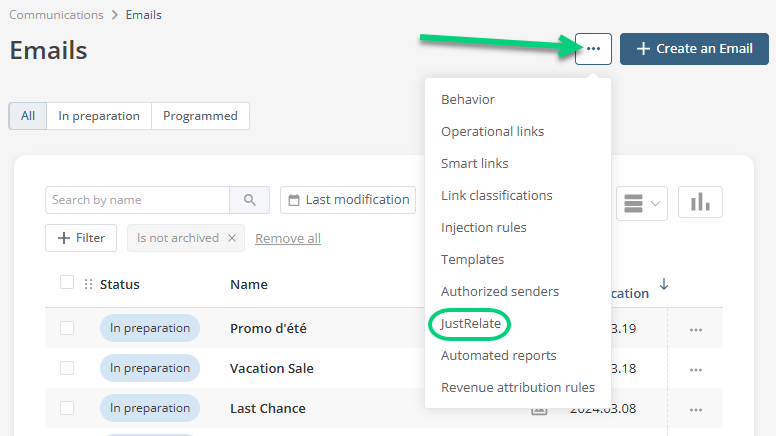
You must then fill-in your account information: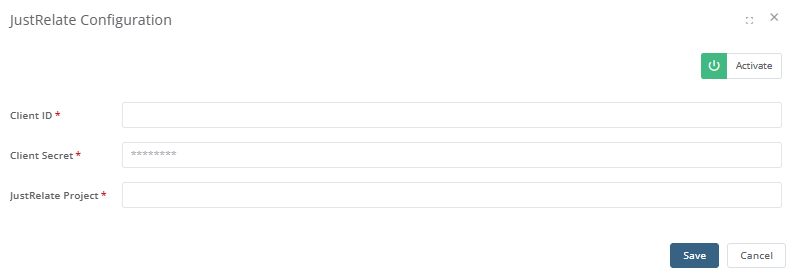 When you are done, save the values and click Save.
Step 2: Create an Email
When using this feature, the email content becomes JustRelate's responsibility so that there are as few modifications as possible on the Dialog Insight side. Dialog Insight makes the transformations necessary for use by the Dialog Insight mailing service, such as image hosting, link tracking, and emoji conversion.
When creating an email in Dialog Insight, you will still have the same standard creation options, but you will find a new JustRelate tab in the Start from section. In this tab, navigate through your JustRelate project folder structure to find the message you want to transfer to Dialog Insight. When you have found the email you want to use, select it and click Create. There can be a short delay after submitting because the platform is fetching and processing the content. When the process is finished, you will be redirected to the email editor in HTML mode.
Images Hosting
Images used in a JustRelate email are hosted in the hosting space of your Dialog Insight's account. These images are grouped in a JustRelate folder, which you can find in the Image Library (in the editor's left panel).
Step 3: Prepare the Email Sending
Properties, such as the subject, the sender and the return address, are not controlled with the JustRelate connection. You must fill-in this info in the Inbox section. Make sure there are no errors or warnings in the message section in the upper right. Some HTML aspects could conflict with Dialog Insight compilation. It is recommended to test your email before sending it.