

In the Email Analytics page, delivery performance shows the delivery pace of your emails—meaning the speed at which Dialog Insight hands off your messages to the various mail servers (Gmail, Outlook, Yahoo, etc.). Good delivery performance allows you to send large volumes quickly, reduce the total delivery time for your campaigns, avoid queues and delays, and ensure an even distribution for time-sensitive mailings. Note that a delivered message may still bounce if there is a delivery error.
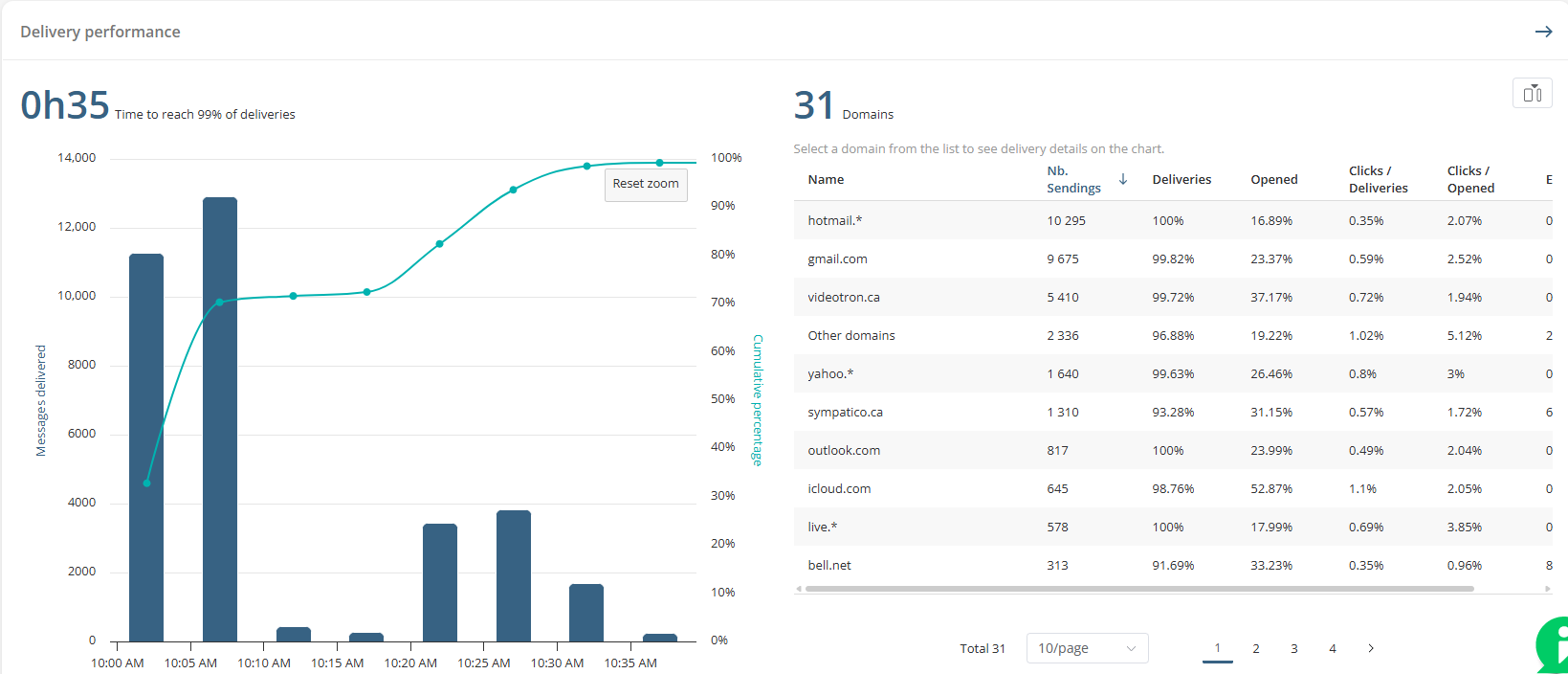
While Dialog Insight can generate your messages at a very high rate (up to several million messages per hour), the final delivery performance of your campaigns depends on several factors, including your sender reputation, message size, the number of IP addresses used for delivery, and the domain distribution of your contact list.
Your recipients’ email providers
Each provider limits the number of messages it accepts within a given period. If a large portion of your contacts use the same domain (e.g., @gmail.com), that domain may become the main factor determining delivery speed. These limits may be technical (server capacity for smaller providers), but more often, they are controls and restrictions enforced by major email providers such as Outlook and Gmail. These providers limit the acceptance rate of messages from each source (IP).
It’s common to see a plateau effect near the end of the delivery window. Often, 50% to 75% of addresses in a list belong to the same three or four major providers. The rest of the list is spread across hundreds of smaller domains, each representing a very small number of emails.
This plateau effect is directly tied to that distribution. At the start of the send, Dialog Insight connects in parallel to all distinct domains and delivers messages for those recipients. Because the number of contacts in those domains is small, delivery for these domains completes very quickly.
Each plateau then represents the completion of deliveries for one of the major domains. Some domains accept messages at very low speeds, so the last few percent of a campaign may take several hours to complete.
Your sender reputation
Your sender reputation is critical to your success, as it affects both the speed at which your messages are delivered and their final placement. Email providers use engagement and recipient behavior to determine how the remainder of an email send will be handled. Contacts who delete a message without reading it, mark it as spam, or never open your emails are all factors that influence your reputation.
If your open rate is low, consider revisiting your communication strategy. Are you targeting the right contacts? Is your content relevant to your audience? Is your content personalized?
The IP addresses used for sending
Major email providers enforce rules that limit the rate at which they accept emails coming from the same source (IP address). In theory, the more IP addresses you use to send your emails, the higher your delivery performance can be. Other factors, such as your sender reputation, can also influence IP performance.
If you are using dedicated IPs to maximize your reputation, it’s important to understand how these factors interact: your delivery performance depends on both the domain distribution of your contact list and the number of IPs assigned to your account. Depending on your performance needs, list size, and domain distribution, you should plan for an appropriate number of IPs.
Message size and structure
Messages that are too heavy (such as those containing multiple high-resolution images, large files, or attachments) can slow down the sending process. The heavier the message, the more data servers must process, which can extend delivery time, especially when sending at scale.
Sending volume and frequency
It’s good practice to send regularly and avoid sudden increases in volume.
For example, if you don’t send any messages throughout the year but send a very large volume on Black Friday, this may be considered suspicious by mail providers and slow down delivery. It’s important to find a balance between sending too often and not sending enough.
When starting to send from a new domain or a new IP, it is recommended to warm up your sender reputation.