

This article presents all the fields used in standard e-commerce tables with the Event structure (see how to generate this structure). This reference aims to provide a consistent view of the data model to simplify data integration, analysis, and use in Dialog Insight. For each table, you will find a list of the fields, including their code, label, type, and description.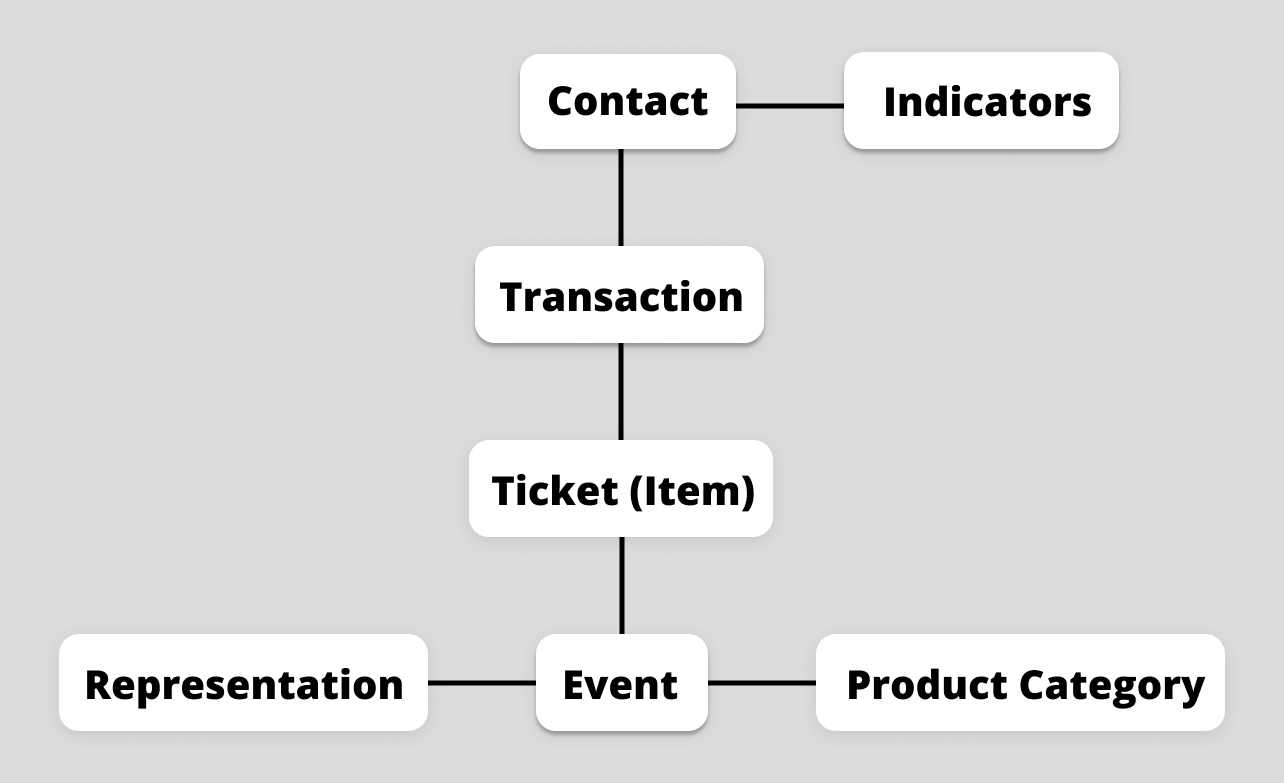
Transaction
This table, linked to the Item (Ticket) table, contains e-commerce transactions made by contacts. Each transaction is linked to a contact. The Transaction table is the central point for analyzing revenue and conversions.
| Code | Label | DataType | Description |
|---|---|---|---|
| customer_id foreign key | Source Person ID | Depending on the primary key of the project:
| ID of the contact who made the transaction |
| idTransaction primary key | Unique transaction ID | NVarChar(500) (Not nullable) | ID of the transaction in the third-party solution |
| idSendLog | Identifier of the sendlog linked ot the transaction | Bigint | ID of the sendlog (Google Analytics) |
| idBatch | Batch identifier linked to the transaction | Int | ID of the idBatch (Google Analytics) |
| Source | Transaction source | NVarChar(100) | Channel or platform that generated the transaction (e.g., website, API, integration) |
| Revenue | Transaction amount | Decimal | Gross revenue from the sold items |
| Shipping | Shipping amount | Decimal | Shipping cost before taxes at the time the order was placed |
| Tax | Tax amount | Decimal | Total of the taxes at the time the order was placed |
| dtTransactionCreatedAt | Date of creation of the transaction | DateTime | Creation date of the transaction in the store |
| dtTransactionUpdatedAt | Transaction information update date | DateTime | Last modification date of the transaction in the store |
| financialStatus | Financial status of the transaction | NVarChar(200) | Payment status of the order (e.g., "Paid", "Pending", "Refunded") |
| fulfillmentStatus | Order processing status | NVarChar(200) | Processing status of the order (e.g., "Processing", "Shipped", "Completed") |
Item (Ticket)
This table details the items (tickets) associated with a transaction. Each record is linked to the Transaction and Event (Product) tables, allowing for analysis of purchase details, quantities, prices, and actual ticket usage.
| Code | Label | DataType | Description |
|---|---|---|---|
| idTransaction foreign key | Transaction ID | NVarChar (100) (not nullable) | ID of the transaction linked to this item, associated with the Transaction table |
| idProduct | Event ID | NVarChar(100) (not nullable) | ID of the event (related to the idProduct field in the Event table) |
| itemStatus | Item status | NVarChar(50) | Status of the ticket (e.g., "Confirmed", "Cancelled") |
| itemCategory | Category ID | NVarChar(100) | ID of the category associated with the item (related to the idCategory field in the ProductCategory table) |
| ticketCount | Nomber of tickets | Int | Number of tickets purchased for this item in the transaction |
| Price_unit | Unit price per ticket | Decimal | Price per ticket |
| Price_total | Total price | Decimal | Total price of the tickets |
| isScan | If the ticket was scanned at the event | Bit | Indicates if the ticket has been validated at the entrance of the event (1 = Yes, 0 = No) |
Event (Product)
This table contains information about events offered. It is linked to the Ticket and Representation tables and allows transactions to be enriched with the event context (dates, location, category, status).
| Code | Label | DataType | Description |
|---|---|---|---|
| idProduct primary key | Event ID | NVarChar(500) (not nullable) | ID of the event |
| ProductName | Event name | NVarChar(500) | The event name |
| Description | Event description | NVarChar(500) | Description of the event |
| Currency | Currency | NVarChar(5) | The currency selected in the E-commerce configuration |
| RegularPrice | Regular price | Decimal | Price before discounts |
| CurrentPrice | Current price | Decimal | Actual price in the store |
| eventStartDateTime | Start date and hour of the event | DateTime | Event starting date (if there are several representations, the first one is used) |
| eventEndDateTime | End date and hour of the event | DateTime | Event ending date (if there are several representations, the last one is used) |
| UrlProduct | Event url on the main site | NVarChar(500) | Link to the main web page for the event |
| UrlImageDefaut | Url to an image that represents the event | NVarChar(500) | Event default image. Only one image is supported |
| eventLocation | Event locations | NVarChar(500) | Event locations |
| Status | Event status | NVarChar(50) | Event status (e.g., "Active", "Inactive", "Sold Out") |
| Source | Source from which the data retrieved from the event comes | NVarChar(50) | Origin of the data imported for the event (e.g., external system, import) |
| eventInfo | Additional information | NVarChar(100) | Additional information about the event (notes, specific details) |
Representation
This table describes the different representations or sessions associated with the same event. It is linked to the Event (Product) table and allows you to distinguish between several dates, locations, or occurrences for the same event product.
| Code | Label | DataType | Description |
|---|---|---|---|
| idRepresentation primary key | Representation ID | NVarChar(100) (non nullable) | ID of the representation |
| dtRepresentation | Representation date and time | DateTime | Date and time of the representation |
| Address | Representation location | NVarChar(100) | Address of the representation location |
| Saison | Representation season | NVarChar(100) | Season during which the representation takes place |
| representationInfo | Additional information | NVarChar(100) | Additional information about the representation (notes, specific details) |
| idProduct | Event ID | NVarChar(500) (not nullable) | ID of the event associated with the representation |
ProductCategory
This table references the categories used to classify events. It is linked to the Event (Product) and Ticket tables to facilitate the segmentation, filtering, and analysis of e-commerce data by event type.
| Code | Label | DataType | Description |
|---|---|---|---|
| idCategory primary key | Category identifier | NVarChar(100) | ID of the category |
| CategoryName | Category name | NVarChar(100) | Category name |